|
Introducing PCEM
PC to Electromask Interface
The PC to Electromask interface program allows you
to have the ease of use of a PC without spending hundreds of thousands
of dollars on an upgrade package for your PG’s hardware for no
realizable increase in mask quality or speed of generation. PCEM
completely obsoletes magnetic tape use, allowing you to design your
masks using your preferred artwork generation software. Simply
put the file on your PC, setup a job, and shoot the mask. Do you
have complex IR jobs? Create a PG file with flashes, again with
your preferred artwork software, and use PCEM to shoot the file in
hybrid mode. Run jobs with the mouse entirely, or use the
command-line style scripting.
System Requirements
PCEM works with any Electromask that runs ASET
6.0/251 or similar versions. Any specific hardware setup will work as
well, whether you have a combination criss-cross machine, just a step
and repeat, or a pattern generator only, with or without the
autoaligner. You’ll also need a BACI board and cable. We give you a new
cable that connects to some simple interface hardware and then to a PC,
and after your satisfied that the the new cable works with both your
dumb
terminal and a PC, trade you for your old one. If you don’t have a BACI
board, one can be supplied for a nominal cost. You’ll also need any IBM
compatible computer running Windows 9X, NT, 2000, ME, etc.
Simple Job Setup
Jobs with many job steps, consisting of any combination of IR, PG, or
hybrid steps, can be created, modified, or ran by the click of a
mouse.

Advanced Scripting Capabilities
Integral to the PCEM package is a capable
scripting subsystem, where you can write a script program that waits
for a specified string of text from the HP1000 before sending whatever
next string of text you specify. This is useful when a command you want
to execute on the PG cannot be entered until the Electromask finishes a
task. Job setup, while done graphically, is compiled into scripts
such as this which PCEM executes on the electromask.
mode fuzzy
sendcr
waitfor ***ASET MASK MAKING PROGRAM, VERSION 06.0***
send SET
sendcr
waitfor *SET*(AF/AX/IR/JO/MA/PG/ST/SY/AU)
send MA
endcr
waitfor ENTER 60 CHAR TITLE
send 11-06-01
sendcr
waitfor TOLERANCE:
send 3
sendcr
waitfor MACHINE UNITS:
sendcr
waitfor X-Y SCALE FACTORS:
Electromask File Serving
All you need to do to send an Electromask formatted file to the PG is
open the file with PCEM and click the send button. Any file created
with one of the many artwork generation programs on the market and
formatted for the Electromask (*.em, *.emk, *.sor extensions to name a
few) will do. Both metric and English types are supported. Just copy
the file to the computer running PCEM over your network and start
making masks. PCEM behaves just as if you had loaded your pattern file
onto a magnetic tape or cassette and started the job from the CRT dumb
terminal, without the headache of using the dumb terminal.
Continued Use of the 251 OS
Since PCEM still utilizes the HP1000 computer, upon startup of the
Electromask PCEM can send your version of the HP’s 251 Operating System
to the PG via a P-2 start. Ever had problems with a finicky tape drive
that made you attempt a P-2 start several times before a successful
bootup? Not anymore with PCEM. If we don’t have your copy of the 251
OS, then you can send a cassette copy of it here for us to convert for
use with PCEM.
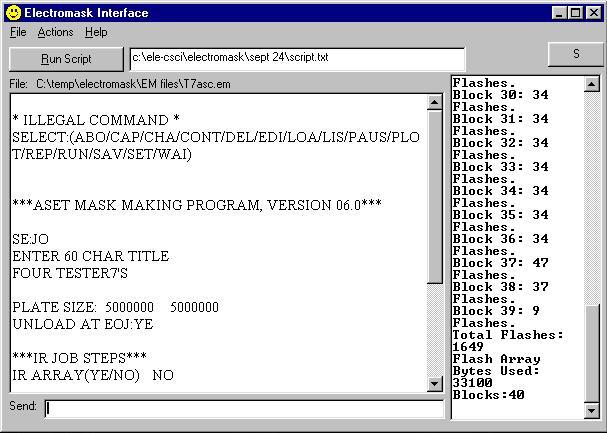
Use your PC just like the dumb terminal
Although PCEM has many features that make your PG much easier to use,
there may still be a need to go back to the old ASET operating system.
PCEM acts just like any terminal program and shows you exactly what’s
going on with the HP1000.
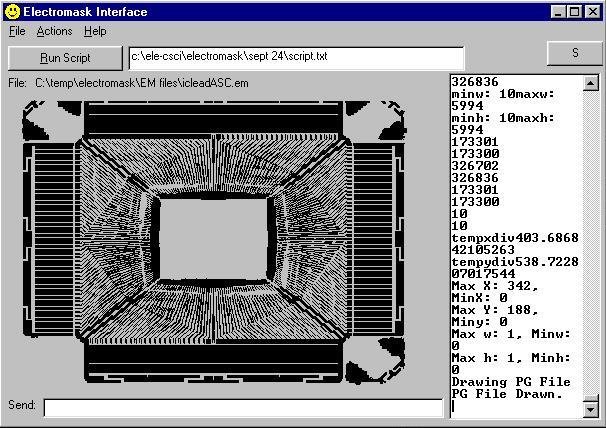
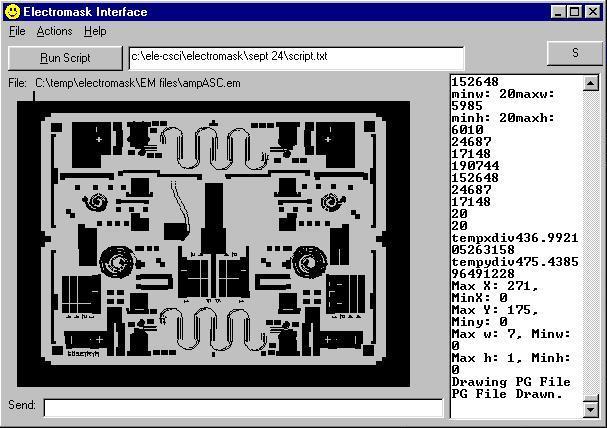
PG-View
For low volume research organizations and
companies that like to visually verify a pattern before shooting a
mask, PCEM has a built-in viewer, complete with feature size
measurements and zoom.
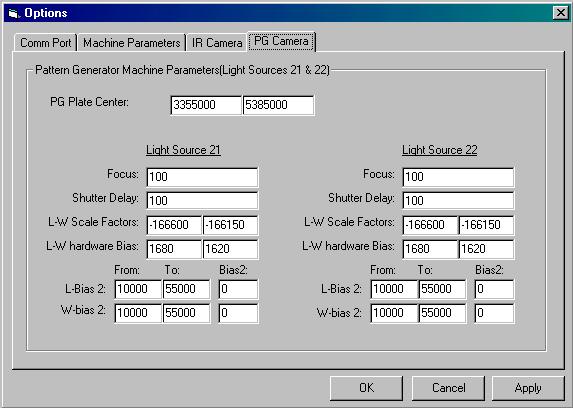
Easy Machine Parameter Editing
Do you dread changing your machine parameters?
Still manually setting the parameters then copying your parameters file
to a cassette for future use? Now, as soon as the operating system is
loaded and P-2 started, PCEM automatically sends your machine
parameters to the PG. Need to change an attribute? Instead of trudging
through ASET’s archaic menu system you can just load the options dialog
in PCEM and change only those values needed.
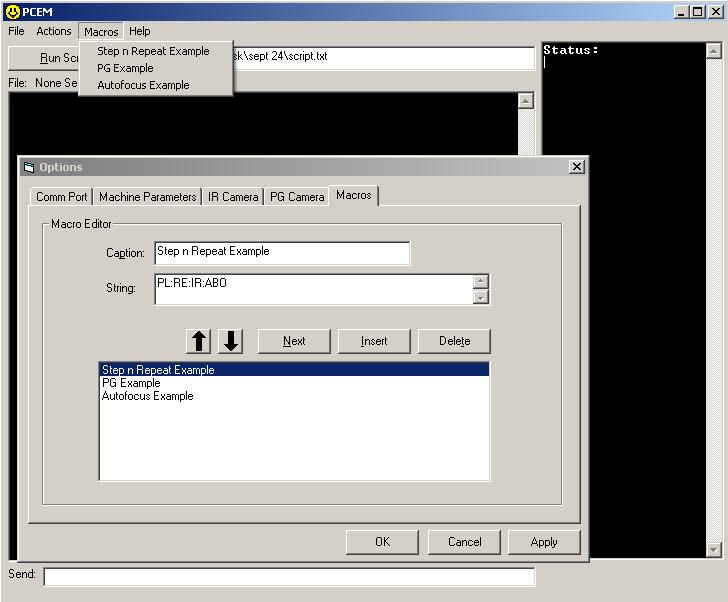
Macros
Easily create macros of commonly-used functions,
from job reports to automatic focus, and create a name for the button
in the menu system.
|


